
If you’ve outgrown a basic website builder and you’re serious about selling online, Shopify is probably already on your radar. It’s one of the most widely used eCommerce platforms in the world, powering everything from small niche shops to big direct-to-consumer brands.
But popularity alone isn’t a good enough reason to move your store. You need to understand how Shopify actually works, what it’s great at, where the trade-offs are, and whether it fits how your business operates.
This detailed review gives you an all-round overview of Shopify as a platform – its tools, advantages and limitations – so you can decide if it’s the right next home for your online store.
What Shopify Is (And What Makes It Different)

Shopify is a hosted eCommerce platform built first and foremost for selling products online. That means:
- You sign up for an account in the browser.
- You configure your store settings (currency, taxes, shipping, payments).
- You add products and organize them into collections.
- You choose a theme and customize your storefront.
- Shopify handles hosting, updates, and the underlying infrastructure.
Unlike general website builders, Shopify’s entire architecture, admin panel, and app ecosystem are designed around running a retail operation. Content pages and blogs exist, but they orbit around the store – not the other way around.
In short: Shopify is not “a website builder with a cart bolted on.” It’s a full commerce engine that also lets you run your website.
The Admin Experience: Built for Store Owners
When you log into Shopify, you’re not dropped into a vague drag-and-drop page editor. You’re taken to a dashboard built around your store’s health: orders and recent activity, sales over time and key metrics, product and inventory views, customer data and basic segmentation.
Navigation menus are structured around real store tasks: managing products, fulfilling orders, handling discounts, viewing analytics, and customizing your online store.
This focus has two main consequences:
- There’s a bit more to learn than in ultra-simple builders, especially if you haven’t dealt with inventory, shipping, or taxes before.
- Once you get comfortable, the platform feels like a control center for your business, not just a place to change page content.
If you’re coming from Weebly or another basic builder, the admin will feel more serious and more structured – but that’s exactly what you want if your store is more than a casual side project.
Read also: Weebly Detailed Review
Themes and Storefront Design
Shopify themes are built specifically to showcase products, guide visitors through collections, and push them smoothly toward checkout.
Theme ecosystem

You’ll find a curated library of free and paid themes, designs tailored to different industries and catalog sizes as well as templates for key pages – home, product, collection, cart and content. Most modern themes include:
- Flexible homepages with sections for collections, hero banners, featured products, testimonials, and content.
- Dedicated layouts for product pages optimized for images, descriptions, reviews, and cross-sells.
- Responsive design that works well on mobile, where a large chunk of eCommerce traffic comes from.
Customization
Using the theme customizer, you can adjust fonts, colors, and global styles, show or hide sections, reorder them, and tweak layouts as well as configure templates for different product or collection types.
You can also go deeper with custom code (Liquid, HTML/CSS) or hire a developer to refine things further, but many stores run successfully on a well-configured theme plus some app-based enhancements.
The big advantage over more generic builders is that Shopify themes are designed with conversion in mind – they’re not just “pretty websites,” they’re storefronts.
Product, Inventory, and Catalog Management
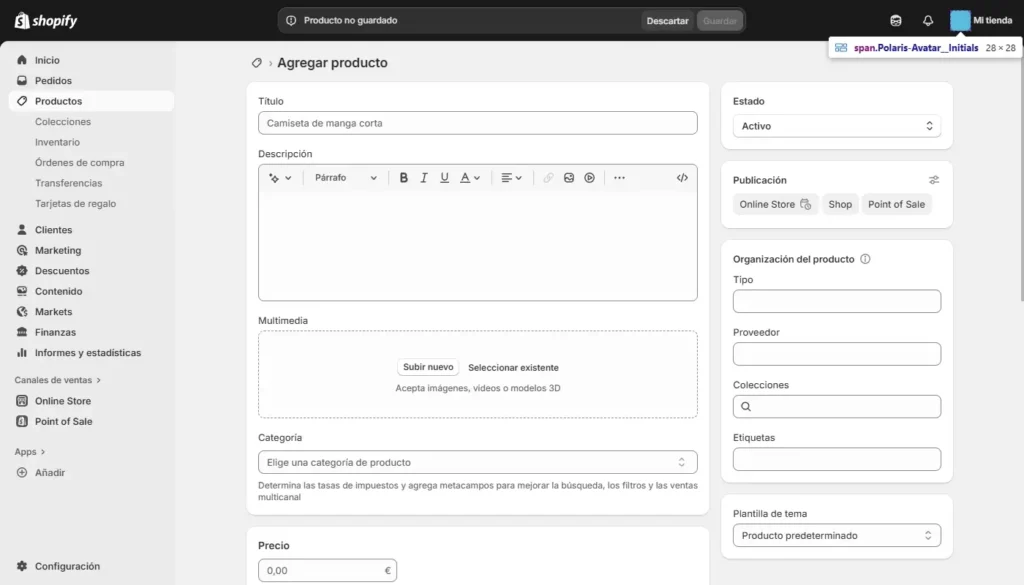
This is where Shopify’s eCommerce-first nature really shows. You can add products with multiple images, rich descriptions, and media, create variants (size, color, material, etc.) with separate SKUs and stock levels, track inventory automatically as orders are placed and organize products into collections (manual or automatic) for easier browsing.
Automatic collections are particularly powerful: you can define rules (e.g., “Tag is ‘summer’ and Price is over $50”) and Shopify will populate those collections dynamically as your catalog evolves.
For stores that outgrow a simple “handmade catalog of 10 products,” this structured approach to inventory and catalog management is a major step up from basic website builders.
Checkout, Payments, and Fulfillment
Checkout
Shopify’s checkout is one of its biggest assets: optimized, tested flows designed to convert, guest checkout and account options, support for various address formats, shipping methods, and tax configurations.
You can’t redesign every pixel of the checkout (for security and reliability reasons), but you can control branding elements, wording, and certain layout aspects depending on your plan.
Payments
Shopify supports Shopify Payments (where available), tightly integrated with the platform, multiple third-party payment gateways and options like PayPal, buy-now-pay-later providers, and digital wallets (region-dependent).
You’ll need to pay attention to transaction fees, especially if you’re not using Shopify Payments, but the upshot is that you can accept money in ways your customers already trust.
Fulfillment and shipping
Shopify includes tools for setting shipping zones, rates, and methods, integrating with carriers and fulfillment services (via apps) and printing labels or tracking shipments.
For small stores, you can manage everything manually. As you grow, apps and integrations let you automate more of the process.
Read also: Weebly vs Shopify — which is better?
Apps and Integrations: Extending Shopify
The Shopify App Store is one of the main reasons merchants choose Shopify over simpler tools.
You’ll find apps for:
- Reviews and user-generated content.
- Email and SMS marketing, automation, and segmentation.
- Loyalty programs, referrals, and VIP systems.
- Subscriptions, memberships, and recurring billing.
- Bundles, upsells, cross-sells, and post-purchase offers.
- Inventory, shipping, and fulfillment optimization.
- Reporting, analytics, and dashboard enhancements.
For most needs, you won’t just find one app – you’ll find several, with different pricing and feature sets. That lets you tailor your stack to your specific business model instead of forcing your processes into a rigid tool.
Of course, this comes with responsibility. You want to avoid bloating your store with unnecessary apps and should choose well-reviewed, actively maintained options. But when used thoughtfully, the app ecosystem turns Shopify into a platform you can keep evolving instead of outgrowing.
SEO, Content, and Blogging
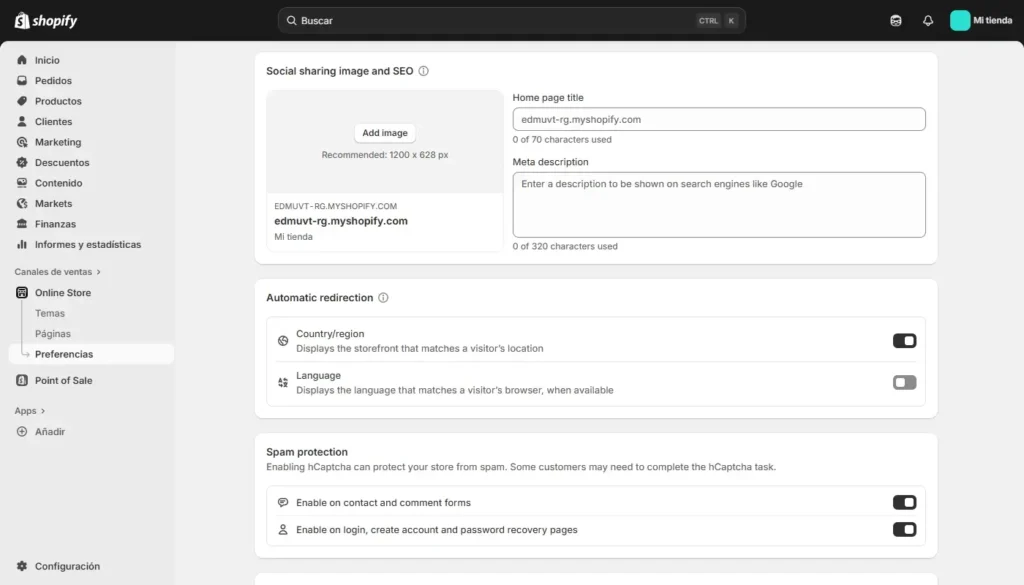
While Shopify is primarily a commerce platform, it includes enough content tools to support a basic content strategy.
You can create pages (About, FAQs, landing pages, etc.), run a blog with posts, tags, and basic categorization, control SEO meta titles and descriptions for products, collections, pages, and posts, configure URL handles and redirects.
On the technical side, Shopify handles sitemaps, basic schema, and a structure that search engines understand for product and collection pages.
If you’re running an extremely content-heavy site (like a massive blog or media property), a dedicated CMS may still be stronger. But for the majority of online stores that combine a catalog + a blog + some landing pages, Shopify’s content capabilities are enough – especially when paired with a smart internal linking strategy and solid keyword research.
Analytics and Reporting
Shopify provides built-in analytics that cover total sales and sales by channel, average order value, conversion rates, and repeat purchase rates, top products, collections, and referrers, basic customer cohort and behavior insights (depending on plan).
You can also integrate with Google Analytics and other external analytics platforms as well as advertising platforms (Meta, Google Ads, etc.) for tracking and attribution.
For many small to mid-size stores, Shopify’s own reporting is sufficient for day-to-day decision making. As you grow, you might lean on apps or external BI tools to go deeper – but the foundation is already there.
Performance, Security, and Maintenance
One of Shopify’s advantages over self-hosted solutions is how much infrastructure work it takes off your plate:
- Hosting and scaling are handled by Shopify’s infrastructure.
- SSL certificates and basic security measures are built in.
- Platform updates happen behind the scenes; you’re not managing core updates.
You’re still responsible for:
- Keeping apps and theme customizations reasonable (too many heavy scripts can slow things down).
- Optimizing images and media.
- Following best practices for account and staff security.
But you don’t have to worry about server configuration, database management, or patching the core platform. For many store owners, that’s a major relief and a big reason to choose a hosted solution.
Pricing and Overall Value
Shopify uses a tiered subscription model plus payment processing fees (which vary by region and payment setup).
You’ll typically be paying for:
- A monthly or annual plan that unlocks certain feature levels.
- Payment processing fees for card transactions or other payment methods.
- Any paid apps you install (some charge monthly, some by usage).
- Optional costs like premium themes or developer help.
On paper, that can look more expensive than basic site builders. But if your store is bringing in meaningful revenue, the right question isn’t “What is the cheapest platform?” but “What platform helps me make more and lose less?”
The value in Shopify comes from:
- Features that protect and grow revenue (conversion-optimized checkout, abandoned cart recovery, promotions).
- Tools and apps that reduce manual work and errors.
- An ecosystem that you won’t quickly outgrow as your store scales.
For a business that seriously depends on online sales, that’s usually worth more than whatever you save with a simpler – but limiting – platform.
Shopify’s Advantages and Trade-Offs at a Glance
Here’s a condensed view of what you gain (and what you take on) with Shopify:
| Aspect | Advantages | Trade-Offs / Considerations |
| Core focus | Built entirely around eCommerce; tools align with selling and fulfillment | Less ideal if your site is purely content-first |
| Ease of use | Clear, store-oriented admin; designed for merchants | More to learn than basic builders; more settings to configure |
| Design & themes | Store-optimized themes; modern layouts and merchandising options | Deep customizations may require code or pro help |
| Apps & integrations | Huge app ecosystem; multiple options for most needs | Too many apps can complicate performance and costs |
| SEO & content | Solid foundations for product-focused SEO; basic blogging | Not a full-blown CMS for massive content programs |
| Performance & security | Hosting, scaling, and core security handled by Shopify | You’re on a proprietary platform; you can’t control infrastructure |
| Pricing & fees | Aligned with store growth; strong ROI when sales are meaningful | Apps and processing fees add up; not the cheapest option on paper |
| Ownership & portability | You own your data but not the platform; exports are possible | Migrating away still requires work and reconstruction |
Who Shopify Is Really Best For
Shopify is at its best when:
- Your website is a store first and a brochure second.
- You want tools that support real revenue, not just a “buy” button.
- You’re ready to invest in marketing, optimization, and better operations.
- You’re okay with a hosted, proprietary platform in exchange for strong infrastructure and a huge app ecosystem.
It’s less suitable if:
- You only sell a few items occasionally and don’t expect that to change.
- Your site is primarily editorial or content-driven with a tiny store on the side.
- You’re looking for absolute minimum cost rather than long-term capability.
If your online store is central to your business, Shopify’s combination of focus, ecosystem, and maturity is hard to beat.
Read also: Best Weebly Alternatives
Final Verdict: Is Shopify Worth Moving To?
Shopify is not the simplest tool on the market, and it’s not the cheapest. It doesn’t try to be. Instead, it aims to be the platform you can build a real online business on – one that supports proper inventory, serious marketing, and sustainable growth.
For a store that genuinely matters – where orders aren’t just “nice to have,” but a core source of revenue – those strengths usually outweigh the learning curve and subscription costs. You get a platform that was designed from day one around the realities of online commerce, with an ecosystem and infrastructure that grows with you instead of holding you back.
If your current platform feels like it’s limiting your store instead of supporting it, that’s a strong sign it’s time to consider a move.
If you’d like a migration checklist or a visual feature comparison to help you kickstart your move, just let me know – happy to help you make a smart and smooth transition!