
If you started your website on Weebly, it probably felt like a relief: drag-and-drop building, bundled hosting, and a quick way to get online without touching code. But once you start treating your site as a real store rather than just a few pages, a new question appears:
Weebly vs Shopify – which is the better platform for what I’m trying to build?
On paper, both let you sell products, manage orders, and accept payments. In practice, they’re built for very different levels of ambition. One is a general website builder that happens to have store features; the other is an eCommerce platform first and everything else second.
In this article, we’ll look at how Weebly and Shopify actually work, compare their strengths and limitations, and help you decide which one makes more sense for your next stage.
1. How Weebly and Shopify Work
Before you compare features, it helps to understand what each tool is really designed to do.
Weebly: Website builder with eCommerce added on

Weebly is a hosted website builder. You create an account, pick a theme, build pages with a visual editor and add store functionality if you want to sell.
eCommerce is one part of a broader “build any simple site” story. The interface and feature set are designed primarily for ease-of-use and low setup time.
Read also: Detailed Weebly review
Shopify: eCommerce platform that can also power a website

Shopify is built first and foremost as an online store engine. You create an account, set up your products and collections, configure shipping, taxes, and payments and finally build content pages, blog, and other parts around the store.
Everything – from the admin panel to the app store – revolves around selling, managing, and scaling an online business. Content pages, blogs, and marketing tools are there to support that goal.
In other words: Weebly is a website builder that can sell. Shopify is a selling machine that can also be your website.
Read also: Shopify Detailed Review
2. Ease of Use: Getting Your Store Off the Ground
Ease of use is one of the main reasons people choose Weebly in the first place.
Weebly: Very simple, especially for tiny shops

Weebly’s drag-and-drop editor is approachable even if you’ve never built a site before. You add sections, drop in text and images, and connect a payment method. For a small catalog with a handful of products, you can get something functional online quickly.
The flip side: the interface hides a lot of complexity by simply not offering many options. That feels great at the beginning and less great when you want more control.
Shopify: Designed for store owners, not just site owners
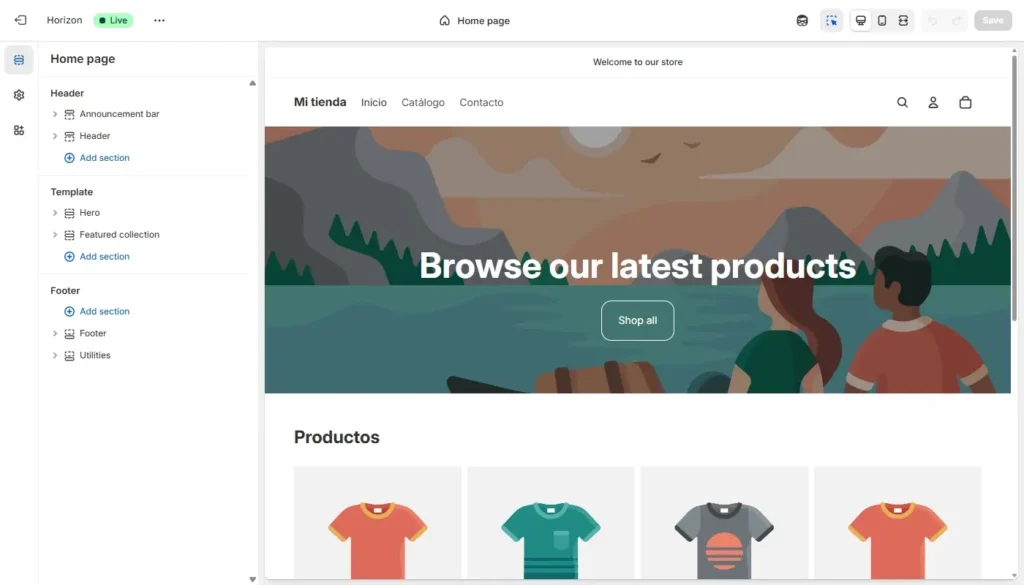
Shopify’s admin interface is more structured. You’ll see menus for Products, Orders, Customers, Analytics and so on. It feels less like a blank page and more like a control panel for a retail operation.
There is a learning curve, especially if you’ve never dealt with inventory, shipping, taxes, or payment gateways before. But the platform guides you through a typical store setup flow, and once you understand the basics, day-to-day management is straightforward.
If your goal is “I want a store I can grow over time,” Shopify’s approach tends to age better. If your goal is “I just want a simple page that can take a few payments,” Weebly’s simplicity is enough.
3. Design, Themes, and Branding
Your store’s look and feel isn’t just about aesthetics – it affects trust, conversion, and how your brand is perceived.
Weebly: Limited but quick-to-launch themes
Weebly offers a modest theme library. Most designs are clean and simple, easy to tweak with basic color and font options as well as fine for simple brochure-style sites with a small shop attached.
For basic stores, it does the job. But when you want more advanced layouts, modern product grids, rich merchandising sections, or strong brand storytelling, the limitations show quickly. It’s harder to build a store that looks and feels like a modern, optimized eCommerce site.
Shopify: Store-first themes that convert
Shopify’s theme ecosystem is built for selling products. Many high-quality free and paid themes purpose-built for stores. Product pages optimized for images, descriptions, reviews and upsells. Homepages with ready-made sections for collections, featured products, stories and social proof. Better support for mobile-first shopping experiences.
You can start with a theme close to your brand style and refine from there. Because the ecosystem is focused on commerce, a lot of conversion best practices are built in by default.
If brand perception and conversion matter, Shopify has a clear advantage in the long run.
4. eCommerce Features: Where the Real Difference Lives
This is the core of the Weebly vs Shopify decision: how serious is your store?
Weebly’s eCommerce: good for small, simple stores
Weebly lets you add products with images, prices and basic variants, organize products into categories, accept payments and handle simple shipping and tax rules.
That’s enough for small catalogs, side-project stores, and situations where online sales are a nice add-on rather than the primary revenue stream.
But when you look for detailed inventory management, advanced discount logic, bundles or upsells, robust abandoned-cart recovery, multi-channel selling (marketplaces, social commerce, POS) and sophisticated reporting on product performance and customer behavior… you hit the edges of what Weebly was designed to do.
Shopify’s eCommerce: built to run a retail operation
Shopify is built as an eCommerce operating system: deep inventory and variant management, multiple payment options and currencies, rich discount and promotion tools, abandoned-cart recovery and email hooks, multi-channel selling (online store, POS, social platforms, marketplaces), strong order management and fulfillment workflows as well as detailed analytics around sales, products and customers.
As your store grows, these features shift from “nice to have” to “absolutely necessary.” The more serious your sales, the more Shopify’s DNA as a commerce platform pays off.
If your store is more than a hobby, Shopify is built for the kind of complexity you’re going to face.
5. Apps, Integrations, and Automation
Modern online stores don’t live in isolation. You’ll want to connect email marketing, CRM, analytics, review platforms, shipping tools and more.
Weebly: Small app center, limited depth
Weebly does have an app center. You can add some marketing widgets, simple automation, and a few extra integrations. For very simple needs, this is enough.
But when you want tight connections to email automation tools, advanced review systems, inventory and fulfillment partners, subscription platforms and loyalty programs… you often won’t find a deep, robust integration in Weebly’s ecosystem.
Shopify: Huge app ecosystem built around eCommerce
Shopify’s App Store is one of its biggest strengths. You will find thousands of apps designed specifically for online stores there and multiple options for most use cases (reviews, email, loyalty, subscriptions, etc.). Integrations with major logistics and fulfillment providers are available there as well – just like tools for upsells, A/B testing, personalization etc.
This ecosystem turns Shopify into something you can tailor to your exact business model. The more your store relies on automation and integrations, the more valuable this becomes.
6. SEO, Performance and Growth
Even a beautiful store doesn’t help if no one finds it. SEO and performance matter for long-term growth.
Weebly: Basic SEO and limited control
Weebly lets you: edit titles and meta descriptions, set basic URLs and add alt text and some structural elements.
For tiny stores or low-competition niches, that may be enough. But you don’t get deep control over technical SEO, structured data, or advanced site architecture.
Shopify: eCommerce-focused SEO foundations
Shopify gives you: good control over product, collection, and page SEO metadata, a structure oriented around products and collections that search engines understand, support for canonical tags and redirects and a platform that continues to improve performance at the infrastructure level.
It’s not as open as a fully custom setup or a self-hosted CMS, but for most small to mid-sized online stores, Shopify’s SEO and performance capabilities are more than enough to build a solid organic presence – provided you invest in content, links, and a sensible site structure.
If you’re planning to grow through search and content, Shopify is generally better aligned with that goal than Weebly.
7. Pricing and Long-Term Value
At first look, Weebly often appears cheaper. But pricing has to be evaluated against what you actually get and what you actually need.
Weebly: low entry cost, limited headroom
Weebly’s lower-tier plans are attractive if you just want a simple site, some basic store features and minimal complexity.
The problem appears when you grow. You can move up Weebly’s tiers, but your capabilities don’t scale at the same rate as your ambitions. You end up paying more while still fighting the limits of a general-purpose builder.
Shopify: built around store economics
Shopify’s pricing is aligned with commerce. You pay a subscription that unlocks serious store features and you may pay additional transaction fees depending on setup. You also layer on paid apps as needed (email, reviews, subscriptions, etc.).
On paper, that can look more expensive than Weebly’s “website plus simple store” approach. In practice, if your store is bringing in meaningful revenue, the additional capabilities easily justify the investment.
If online sales are central to your business, it’s usually better to pay for a platform built around stores than to save a little on a platform that caps your growth.
8. Weebly vs Shopify at a Glance
Here’s a quick comparison to sum up the differences:
| Aspect | Weebly | Shopify |
| Core focus | Simple websites with optional store | eCommerce platform first, website/CMS second |
| Ease of use | Very simple for tiny sites and small catalogs | Structured, store-focused; a bit more to learn, scales better |
| Design & themes | Limited selection, fine for basic sites | Store-optimized themes, modern layouts, better merchandising |
| eCommerce features | OK for small, simple shops | Deep, robust features for serious online retail |
| Apps & integrations | Small app center, limited vertical depth | Huge app ecosystem dedicated to eCommerce |
| SEO & performance | Basic SEO controls, limited technical depth | Strong commerce-oriented SEO foundations and ongoing improvements |
| Growth and scalability | Suitable for staying small | Businesses that rely on their store for real revenue and growth |
| Best for | Side projects, simple sites with a small shop attached | Built to support growth, channels, automation, and complexity |
9. How to Decide: Which Is the Better Choice for You?
Instead of asking “Which is better in general?” it’s more useful to ask:
“How important is my online store to my business – and how big could it realistically become?”
Weebly can be enough if:
- You sell a few products as a side offering.
- Your site is primarily informational, and the store is secondary.
- You value extreme simplicity and don’t expect major growth.
Shopify is usually the smarter choice if:
- Your primary goal is selling online.
- You plan to grow your catalog, traffic, and revenue over time.
- You want real eCommerce tools, automations and integrations.
- You see your store as a core part of your business, not an afterthought.
The more serious your store is, the more Shopify’s “commerce-first” approach becomes not just nicer, but necessary.
Final Verdict: Weebly vs Shopify
If all you need is a small, simple website that happens to sell a few items, Weebly can handle it. You’ll enjoy a friendly editor and a low-friction setup, and for very modest sales, that may be enough.
But if your store is tied to real revenue, real customers, and real growth plans, you’re better served on a platform that was built to run an online business, not just add a cart to a website. Shopify offers deeper eCommerce features, stronger integrations, better growth paths, and a whole ecosystem focused on making online selling work.
If you’d like a migration checklist or a visual feature comparison to help you kickstart your move, just let me know – happy to help you make a smart and smooth transition!
Read also: Leading Weebly Alternatives